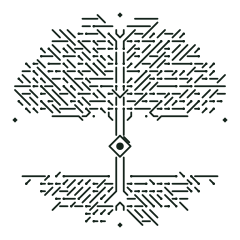
Turn any text or link into a TreeXcode
A tree-shaped matrix code with built-in error correction. Free, instant, and scannable — encode URLs, Wi-Fi, contacts, phone numbers and more.
Scan with the TreeXcode app
Native scanner apps for iOS and Android are on the way — point your camera at any TreeXcode and open it instantly.
Meanwhile, the in-browser Scan page reads codes from an image or your camera.
Why TreeXcode
Everything a QR code does, with a look nobody forgets — and an open, documented format anyone can implement.
Grown, not printed
Each code is a unique circuit tree: crown, roots, trunk ornament and a central node that marks orientation.
Reed–Solomon protected
Data survives scratches, glare and partial damage thanks to configurable error correction.
Any content
Links, plain text, Wi-Fi, email, phone, geo-location and contacts.
Camera-friendly
Four diamond fiducials and a central anchor let a scanner correct for angle and perspective.
Open format
The full math, layout and reference Python scripts are published under Apache 2.0 so anyone can build compatible tools.
Runs in your browser
No account, no upload, no tracking. Your data never leaves the page.
TreeXcode vs. QR code
A familiar idea in a new shape.
| QR code | TreeXcode | |
|---|---|---|
| Two-dimensional data matrix | Yes | Yes |
| Error correction | Reed–Solomon | Reed–Solomon (configurable) |
| Orientation & perspective markers | Finder squares | Central node + 4 diamonds |
| Shape | Square grid | Circuit tree |
| Custom artwork background | Limited | Design your own within the coding zones |
| Open, documented math | ISO standard | Published spec + Python reference |
Frequently asked questions
What is a TreeXcode?
A TreeXcode is a two-dimensional matrix code shaped like a circuit tree. It stores data the same way a QR code does — error-corrected symbols packed into a grid — but the grid is arranged inside a tree silhouette with fiducial markers so a camera can find and read it.
Is it a QR code?
It is a QR-code alternative built on the same principles (2-bit symbols, Reed–Solomon error correction, a checksum), rendered as a tree. See the how-it-works page for the exact format.
How much data fits?
The tree grows automatically to fit your content, and you can nudge the size with the −/+ controls. Small links use a compact tree; longer text grows a larger one, up to several hundred bytes with medium error correction.
Can I design my own tree background?
Yes. The trunk ornament is decorative — you can replace it with your own artwork as long as you respect the coding zones and the marker positions. The documentation shows the exact boundaries.
Can I read a TreeXcode?
Use the Scan page to decode an image, grab the upcoming mobile app, or download the reference Python decoder from the documentation.